Keap Does Text Messaging
Out-Of-The-Box!
I'm a proud user of Keap and ever since I've been using the software since 2008 when it was called Infusionsoft and, anytime you wanted to do automated text messaging, you would need a 3rd party tool. This meant that you had to take on additional overhead usually in the form of some type of subscription plus the usage fee of how many texts you actually send.
Earlier this year Keap unveiled the ability to send text messages directly out of the software for only 4 cents each.
So being the early adopter that I am, I wanted to start using this feature immediately.
Step One - Bolt On A Text Message Option
To Your Existing Opt-in
I've been collecting names and emails for this newsletter since 2012. While not everybody has stayed, it's still a pretty exciting list for a guy like me.
I wanted to first make sure that any new subscriber moving forward would have the option to opt-in for text messaging immediately. So I went into my newsletter campaign and I added a second opt-in form after the main one that invites them to give their phone number for text messages. However, this form is NOT on the thank you page. I send a separate email because I only want those who are most engaged to receive the text messages; 4 cents a message will add up quickly and I don’t want to bother unengaged people.
And of course, there would be a confirmation text to let them know that everything went through properly once they share their phone number.
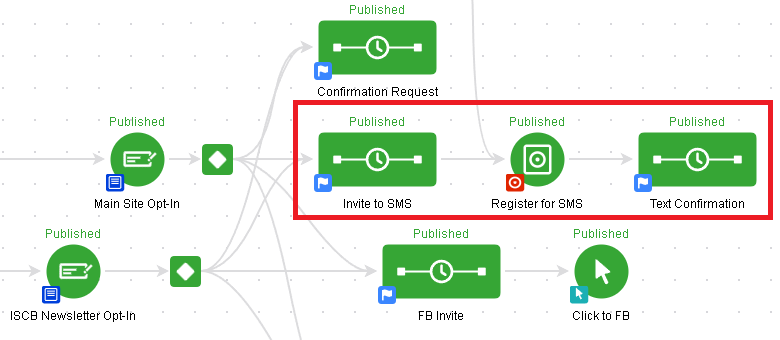
The red box is the new stuff I added. Tap for full size image.
Step Two - Invite Your Existing List
To The Opt-in Form That You Just Created
From here I pulled an old broadcast expander off the shelf and I invited my list. You probably remember seeing these emails a while back unless you signed up recently. Since I wanted to minimize people leaving the list, I added a soft opt-out of the bottom where they could click a link and say I'm not interested in text messaging. This ensured that people could have their email preferences respected while also not completely unsubscribing from the database.
All in all I think about 5 real unsubscribes came through total in the whole campaign. And, honestly, I'm OK with that. List attrition is a real thing and a lot of those names either I didn't recognize or hadn't spoken to those people in a long time.
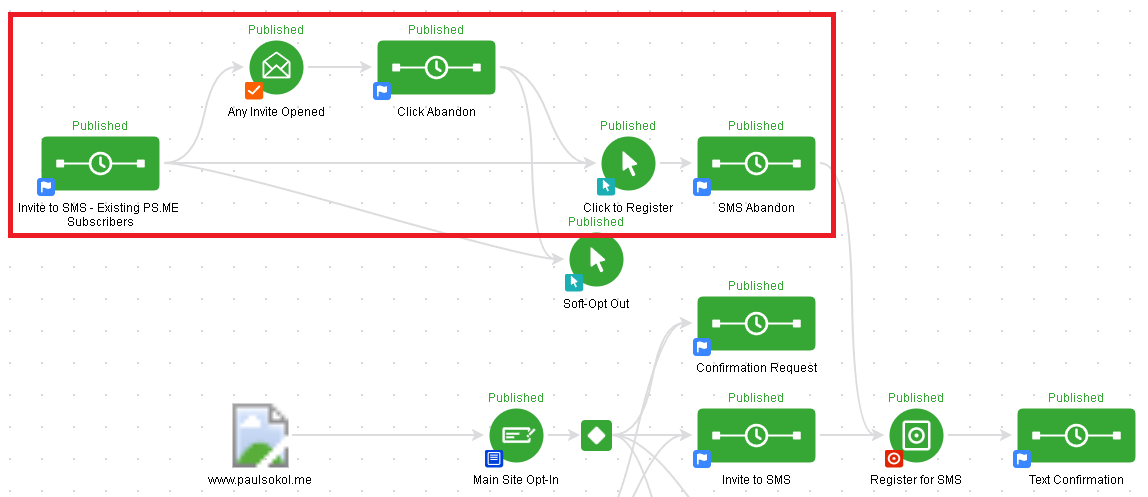
How old am I? The traffic sources on this campaign are still there but the .png is broken because those disappeared from campaign builder AGES ago >_<
Step Three - Deploy Text Message Notifications With The Next Newsletter Broadcast (And Every One Moving Forward)
Now comes the fun part. When building a normal broadcast expander I've now peppered in text message notifications. These notifications are transactional and simply let the recipient know that they've got an exciting email waiting for them.
So there you have it. Adding text messaging to your email campaigns should help with awareness and engagement. Make sure that you add a phone option to your existing sign ups, then invite your existing list to get the notifications, and then lastly make sure to use them when you send a broadcast.
In fact, I helped the illustrious Gregory Jenkins of Monkeypod Marketing (and my dear personal friend) set up his text notifications for the different segments of his database. We did it as a whole case study which you can expect to see in the future.
Take it home with ya!
Create a great ,
Paul Sokol
Author of the Official Infusionsoft Cookbook
(Not part of my "Under the Hair" emails? Add Yourself Here!)